Tooling & Control
TinyMQ ships two first-class control interfaces: an embedded web dashboard at /dashboard and a native CLI binary called tmq. Both connect to the broker over HTTP and require no special authentication.
The Interactive Dashboard
Visit http://localhost:7800/dashboard in any browser while the broker is running to access the interactive web interface.
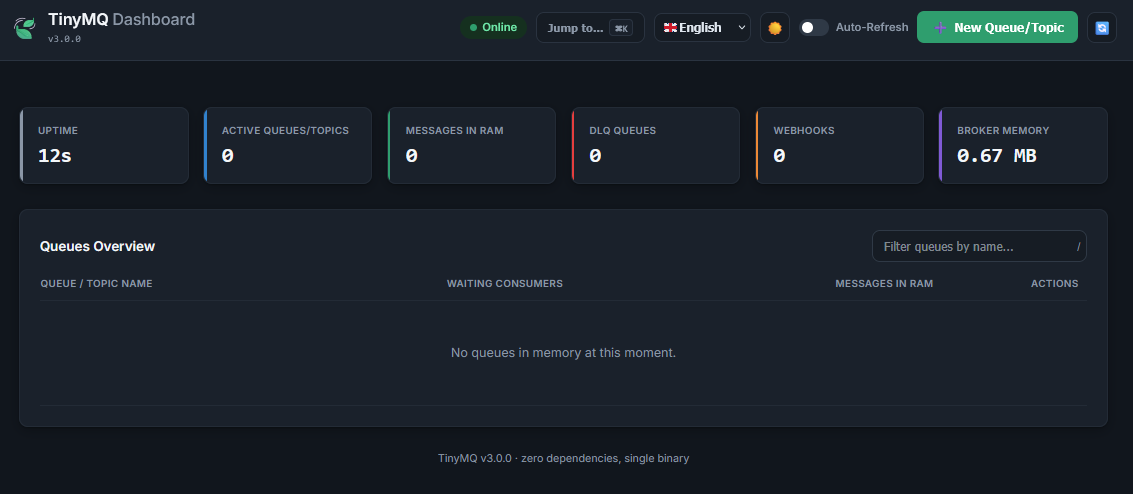
Dashboard Capabilities
- Auto-Refresh mode (automatically reloads every 3s).
- Uptime and memory footprint monitoring.
- Visual indicators for Active Webhooks and Dead Letter Queues (DLQ).
- Manual topic creation UI.
- Real-time waiting consumers tracking.
- Dark mode support (full
data-themeCSS theming). - Cluster Topology Map: Dynamically visualizes the Raft cluster, showing Leader status and live node health across the swarm.
- Embedded Publisher: Publish messages directly from the UI, supporting Priority, TTL, and Delay inputs.
- Internationalization: Switch between 🇬🇧 English and 🇪🇸 Spanish directly in the UI.
- Command Palette (
Ctrl+K/Cmd+K) — search queues and fire quick actions (Publish, Consume, Tail) from a floating dialog. - Sortable columns — click any column header (Queue Name, Messages, Consumers) to sort ascending/descending.
- Skeleton loaders — animated placeholders during initial data load.
- JSON syntax highlighting in peek/consume output modals.
/shortcut — press/anywhere to instantly focus the queue search/filter input.
The dashboard renders a live metrics grid and a sortable topic table. All logic runs in Vanilla JS — no React, no Vue, no bundle size tax.
Metrics Grid:
| Card | Description |
|---|---|
| Uptime | How long the broker process has been running |
| Active Queues/Topics | Total number of topics with at least one message or waiting consumer |
| Messages in RAM | Total messages held across all queues |
| Webhooks | Total registered webhook endpoints |
| Broker Memory | Go runtime runtime.MemStats.Alloc — actual heap in use |
Topic Table Columns:
| Column | Description |
|---|---|
| Queue / Topic Name | Topic identifier. DLQ topics shown with a red DLQ badge; webhook-enabled topics with an orange Webhook badge |
| Waiting Consumers | Number of long-polling consumers currently blocking on this topic |
| Messages in RAM | Current message count in the queue |
| Actions | Inline buttons: Publish, Consume (Pop), 👁️ Peek, Purge, Delete |
Auto-Refresh
Toggle Auto-Refresh in the top control bar. When enabled, the page reloads every 3 seconds. The setting is persisted in localStorage so it survives page reloads.
Auto-Refresh pauses automatically when any modal (Publish, Consume, Peek) is open to prevent the page from refreshing while you're reading output.
Queue Management Actions
You can interact directly with the queues via the dashboard:
- Publish: Send a payload (supports TTL, Delay, Priority, Broadcast). Uses
POST /api/queues/publish. - Consume (Pop): Immediately dequeue a message. Uses
GET /api/queues/consume. - Peek: View up to 10 messages without dequeuing them.
- Tail: Live tail a topic using SSE.
- Purge: Empty a queue of all messages.
- Delete: Permanently delete the queue and its WAL file.
- Webhooks: View and manage webhooks attached to the topic.
The tmq CLI
tmq is a terminal-based control panel for TinyMQ. It connects to the broker over HTTP and presents colored, tabwriter-aligned output.
Installation
Download from GitHub Releases or install via Go:
go install github.com/x-name15/tinymq/cmd/tmq@latest
Configuration
Set TINYMQ_URL to point at a non-local broker:
export TINYMQ_URL=http://192.168.1.100:7800
(Default is http://localhost:7800)
If your broker requires authentication, export the API key:
export TINYMQ_API_KEY=your_secret_key
Command Reference
tmq status / tmq list
Displays a formatted table of all active topics, their message counts, waiting consumer count, type, and webhook status.
tmq status
tmq pub — Publish a Message
# Basic publish
tmq pub orders.eu '{"user_id": 42, "item": "laptop"}'

# With TTL (expire in 5 minutes)
tmq pub orders.eu '{"user_id": 42}' --ttl=5m

# With delivery delay
tmq pub notifications '{"msg": "hello"}' --delay=10s

# Broadcast to all waiting consumers
tmq pub cache.invalidate '{"entity": "product"}' --broadcast
tmq sub — Consume Messages
# Consume one message (auto-acknowledged)
tmq sub orders.eu

# Wait up to 10s for a message if queue is empty (long-polling)
tmq sub orders.eu --timeout=10s

# Consume a batch of 5 messages
tmq sub orders.eu --limit=5

# Consume without auto-acknowledging (manual ACK required)
tmq sub orders.eu --auto-ack=false
tmq peek — Inspect RAM (Non-Destructive)
Reads messages from the queue without removing them. Safe for debugging.
tmq peek orders.eu --limit=3
tmq tail — Live Spy Mode
Continuously streams messages from a topic in real-time (using SSE). Each message is printed as it arrives. Press Ctrl+C to exit. Auto-reconnects on failure.
tmq tail orders.eu
tmq top — Live Terminal Dashboard
Opens an interactive, auto-refreshing dashboard right in your terminal. It clears the screen and updates the queue list every 2 seconds.
tmq top
tmq shell — Interactive REPL
Starts an interactive session where you can run tmq commands without typing the tmq prefix.
tmq shell
> status
> peek orders
> exit
tmq rm / tmq delete
Deletes a queue entirely via the API.
tmq rm orders.eu
tmq purge
Empties all messages from a queue but leaves the queue intact.
tmq purge orders.eu
tmq group
Manage Consumer Groups for Pub/Sub messaging without message stealing. This can be used both as a top-level command and within tmq shell.
# Create a consumer group on a topic
tmq group create orders.eu workers

# List all groups for a topic
tmq group list orders.eu
tmq create — Provision a Topic
Explicitly provisions a queue via POST /api/topics. Useful for pre-configuring topics with specific policies before the first message arrives.
# Create a topic with default settings
tmq create analytics.events

# Create with overflow policy and 24h auto-expiry on all messages
tmq create sensor.data --policy=drop-oldest --retention=24h
tmq cluster
Diagnose and view peer status when running TinyMQ in High Availability mode.
# View current node's cluster role and term
tmq cluster status

# List all known peers and their health
tmq cluster peers

# Continuously refresh peer table every 2 seconds
tmq cluster peers --watch

# Gracefully drain a node before maintenance (restarts, config changes)
# Note: always specify the target URL explicitly to avoid draining the wrong node
tmq cluster drain http://node-2:7800
tmq webhook
Manage webhooks for a specific topic.
# List webhooks
tmq webhook list orders.eu

# Add a webhook
tmq webhook add orders.eu https://my-api.com/hook
tmq bench — Stress Testing
Run a high-concurrency benchmark against the broker.
tmq bench --protocol=http --total=10000 --concurrency=50 --target=orders
Supported protocols: http, nats.
tmq backup & tmq restore
Backup and restore the broker's WAL data files directly from the CLI.
# Create a backup archive (zip or tar.gz)
tmq backup my_backup.zip

#### `tmq restore`

Restore the broker's WAL data files from an archive.

```bash
# Restore from an archive
tmq restore --file=my_backup.zip --data-dir=./data
tmq dlq redrive
Redrive all dead-lettered messages from a topic's DLQ (<topic>.dlq) back to the main topic queue, resetting their retry counters.
tmq dlq redrive orders.eu
tmq doctor
Run local sanity checks on the data directory, ports, environment variables, and broker reachability to diagnose configuration issues.
tmq doctor
CLI Quick Reference
tmq status
tmq top
tmq shell
tmq doctor
tmq create <topic> [--policy=reject|drop-oldest] [--retention=duration]
tmq pub <topic> <payload> [--ttl=duration] [--delay=duration] [--broadcast]
tmq sub <topic> [--timeout=duration] [--limit=count] [--auto-ack=true/false]
tmq peek <topic> [--limit=count]
tmq tail <topic>
tmq rm <topic>
tmq purge <topic>
tmq group list <topic>
tmq group create <topic> <group>
tmq dlq redrive <topic>
tmq cluster status
tmq cluster peers [--watch]
tmq cluster drain <node-url>
tmq webhook list <topic>
tmq webhook add <topic> <url>
tmq bench [--protocol=http|nats] [--total=10000] [--concurrency=50] [--target=<ip:port>]
tmq backup <filename>
tmq restore --file=<archive> --data-dir=<path>